Is Your Profile Ready for the Spotlight?
Profile Score Tips
Your CreativeGround Profile has multiple sections that provide lots of opportunity for you to share the details about your creative work and collaborators.
- Create a public Profile for you, your organization, or your business today
- Update your Profile every six months to advertise your Activities and Services
- Follow our tips and tricks for maintaining a high Profile Score
Need to start from a user account? Get the basics on getting started in 1-2-3.
What Is a Profile Score?
What Is a Profile Score?
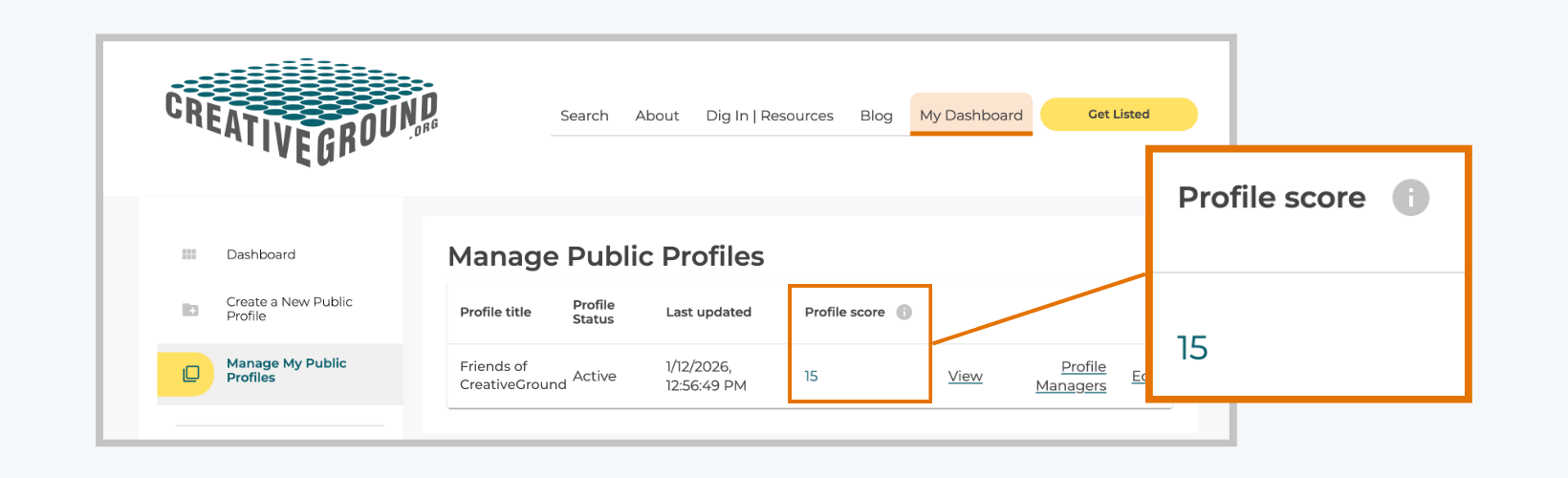
Each public Profile has a Profile Score indicating how much it has been tended. A profile score is private - only a Profile's own manager is able to view that Profile’s numeric score.
To find your Profile Score
- Log into CreativeGround
- Click on My Dashboard > Manage My Public Profile
What Are the Profile Score Ranges?
What Are the Profile Score Ranges?
While you can always nurture your Profile, we suggest using these ranges as a guide for what stage of growth it’s in - and take your Profile to the next level by following the tips in the "How Do I Grow My Profile Score?" section.
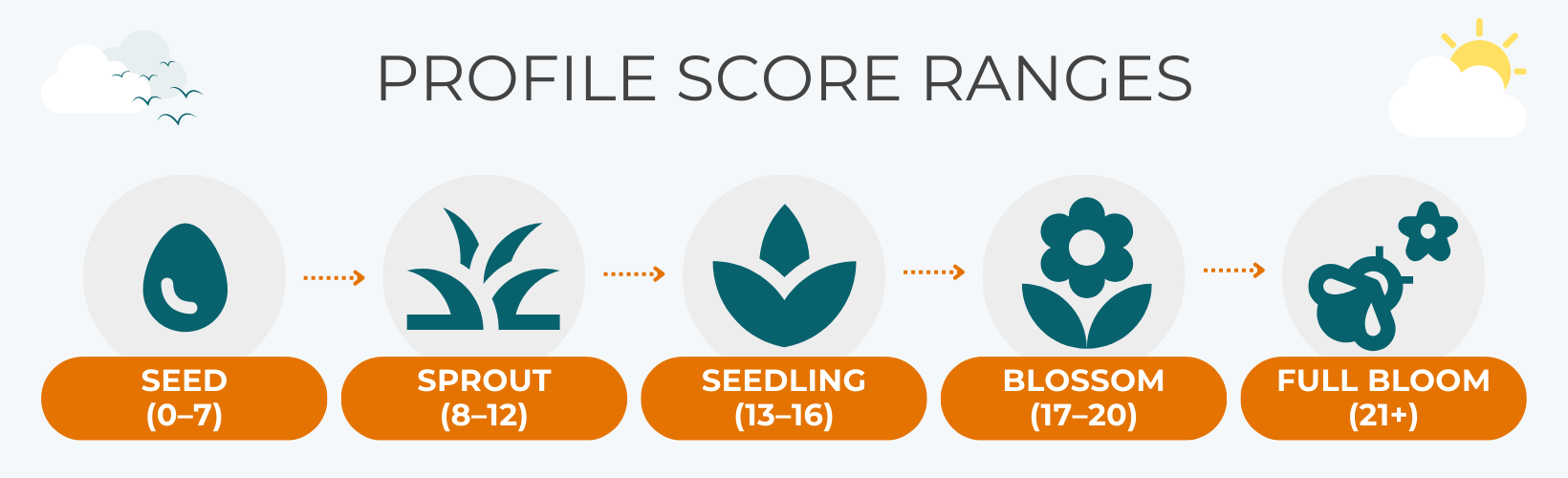
- 0 - 7 | Seed: You’ve created your Profile; you’re off to a great start!
- 8 - 12 | Sprout: Your Profile is starting to shine brighter!
- 13 – 16 | Seedling: Your Profile tending is paying off and you are more likely to get noticed at this stage – keep growing!
- 17 – 20 | Blossom: Your Profile is rich with information that expresses who you are and what you do - just a few more details to reach full potential!
- 21+ | Full Bloom: Your Profile is looking fantastic! It will always need regular pruning; remember to update it at least every six months to keep it healthy and current.
Now that you know what profile score range you are currently in, use the checklist below to grow into the next level. Tips are marked with the icon for each profile score range.
PROFILE SCORE RANGES

Tips to help Seeds (0-7) grow into Sprouts 
Tips to help Sprouts (8-12) grow into Seedlings 
Tips to help Seedlings (13-16) grow into Blossoms 
Tips to help Blossoms (17-20) grow into Full Blooms 
Tips to help Full Blooms (21+) maintain their visibility 
Tips that improve your profile, but DO NOT affect profile scores BASIC REQUIRED INFORMATION
All required fields Complete all fields marked with red asterisks (*) in the following sections (see below for more detail):
- Name
- Contact Information
- Legal Details
- Professional Disciplines
- Professional Activities and Services
Keep all required fields up to date (six months).
Contact Information
Public Contact Make sure your Public Contact Email is up to date - this is how people will contact you through your profile. Legal Details
Institution/Business Type CreativeGround is also a research database. Select the Institution / Business Type that best represents your enterprise, and you will see the options for selecting the correct Legal Status for your profile.
Legal Status How you file your taxes matters when it comes to applying for grants or signing contracts.
Find out what to list as your legal status if you have a fiscal sponsor
Professional Activities and Services
Profile Description Give us the dirt! Use the Description of Work and Background to summarize who you are and what you do in your own words.
Update your description to match your selections throughout your profile such as Professional Disciplines, Activities & Services, and Populations Engaged.
Plant the seeds to make your Profile findable. Use keywords that searchers would use to find profiles like yours - include special themes or materials that are your focus. Avoid lists of awards or pasting in a resume or abstract statements.
Activities & Services
Make it clear to your potential audiences and collaborators how they can work with you. Does your group offer workshops, or perform? Are you an artist who teaches lessons or offers professional development? Can your organization provide support services, like consulting?
When selecting Activities & Services on your profile, less is often more. Selecting only the top five or so activities that you offer can lead to more relevant results for searchers looking for your services and help increase the searchability of your profile. Choose 5-10 options across all categories to express what you currently do.
Language(s) of Services and Populations Engaged Send out the call to your communities by including the 5-10 top groups you engage and how you specifically work with them. For example, are you an organization that works with immigrant communities, or do you offer services in ASL (American Sign Language)? Geographic Reach What ground do you cover? Indicate the reach of your activities from the town / city to international level. ARTISTS ONLY
Native American Artist This profile is for a Native American Artist What does the Native American Artist designation on a profile mean? What is tribal status? Teaching Artist This profile is for a Teaching Artist What does the Teaching Artist designation mean? Teaching Fees There is often context needed when describing your fees (for example, for different programs or ensemble configurations), so these fee range fields are intentionally open text rather than just numerical. Remember to update these fields often as your fee ranges change! Touring Artist This profile is for a performing artist or artist group that tours What does the Touring Artist designation mean? Touring Fees There is often context needed when describing your fees (for example, for different programs or ensemble configurations), so these fee range fields are intentionally open text rather than just numerical. Remember to update these fields often as your fee ranges change! PROFILE IMAGES & OTHER MEDIA
Primary Profile Image Use an image of you at work, a picture of your work, or an image that shows what your organization or business does. This is your first impression, so help searchers pick your Profile from the bunch!
Avoid using logos or headshots; searchers are more likely to click through to Profiles with pictures of creative activity as their main image.
Image and Video Gallery Add image and/or video representations of your work. We recommend at least three. Be sure to include meaningful captions, alt text, and crediting.
Fill your media gallery up with the maximum number of images and/or video (9, plus 1 main profile image)
Bonus Tip: Need visual documentation of your work? Search CreativeGround for people and organizations that offer photography and videography services.
Social Media Include social media handles if you have them. (Your website is listed in your contact info) Additional Content Use this section to include links to non-visual examples of your work and fundraising platforms. Anything hosted online can be linked to here and you can add a title and description.
I HAVE WORKED WITH
Relationships List at least three recent collaborators in this section to demonstrate your working relationships. They can be within or outside New England
Add 10+ entries (you can list a maximum of 25)
If your collaborators are based in New England, connect their CreativeGround profile to yours by searching for their name using the Related Profile Name field. If they're not New England-based, add their name manually.
AFFILIATIONS & ACCOMPLISHMENTS
Special Designations NEFA Grant Recipient How does a profile get the NEFA grant recipient designation? Creative Communities Exchange Presenter What does Creative Communities Exchange presenter mean? New England Arts Presenters Member What does the member of Arts Presenters of Northern New England (APNNE) or New England Presenters designation mean? Designated Arts Communities What is a Designated Arts Community (DAC) and how does DAC membership work? VENUES FOR RENT/USE
Venue Information Finding space for creative activities can be a common challenge in our region. If you manage a studio, stage, rehearsal space, conference room, etc. available to rent, include it on your profile! Fee Range There is often context needed when describing your fees (for example, for different programs or ensemble configurations), so these fee range fields are intentionally open text rather than just numerical. Remember to update these fields often as your fee ranges change!
How Does a Profile Score Benefit My Profile?
How Does a Profile Score Benefit My Profile?
The Profile Score is not a ranking system comparing the work of one Profile to another. Rather, it’s a reflections of how much attention has been put on a Profile, and a tool to help Profile owners understand how to connect with searchers and boost their sitewide visibility. We aim for the Profile Score to achieve the following benefits:
- The Profile Score helps profile managers know which information on their Profiles to regularly maintain. We’ve taken out the guesswork about what information site users are looking for on Profiles. Use your Profile Score as a guide to where you should spend the most time and energy on Profile updates.
- It helps people searching the site to easily sift through search results to find active Profiles that contain the information they need to inspire connection
- It creates the opportunity for every Profile to boost their visibility with audiences they most want to reach
- It can help your Profile stand out to be nominated for a CreativeGround Spotlight